Introduction
Triton Inference Server enables teams to deploy any AI model from multiple deep learning and machine learning frameworks, including TensorRT, TensorFlow, PyTorch, ONNX, OpenVINO, Python, RAPIDS FIL, and more. Triton supports inference across cloud, data center, edge and embedded devices on NVIDIA GPUs, x86 and ARM CPU, or AWS Inferentia. Triton Inference Server delivers optimized performance for many query types, including real time, batched, ensembles and audio/video streaming. Triton inference Server is part of NVIDIA AI Enterprise.
Major features include:
- Supports multiple deep learning frameworks
- Supports multiple machine learning frameworks
- Concurrent model execution
- Dynamic batching
- Sequence batching and implicit state management for stateful models
- Provides Backend API that allows adding custom backends and pre/post processing operations
- Model pipelines using Ensembling or Business Logic Scripting (BLS)
- HTTP/REST and GRPC inference protocols based on the community developed KServe protocol
- A C API and Java API allow Triton to link directly into your application for edge and other in-process use cases
- Metrics indicating GPU utilization, server throughput, server latency, and more
Source: Triton Inference Server | NVIDIA NGC
Inference Images
Triton Inference Server provides a cloud and edge inferencing solution optimized for both CPUs and GPUs. Triton supports an HTTP/REST and GRPC protocol that allows remote clients to request inferencing for any model being managed by the server. For edge deployments, Triton is available as a shared library with a C API that allows the full functionality of Triton to be included directly in an application. According to the nvidia official documentation five Docker images are available:
- The
xx.yy-py3image contains the Triton inference server with support for Tensorflow, PyTorch, TensorRT, ONNX and OpenVINO models. - The
xx.yy-py3-sdkimage contains Python and C++ client libraries, client examples, and the Model Analyzer. - The
xx.yy-py3-minimage is used as the base for creating custom Triton server containers as described in Customize Triton Container. - The
xx.yy-pyt-python-py3image contains the Triton Inference Server with support for PyTorch and Python backends only. - The
xx.yy-tf2-python-py3image contains the Triton Inference Server with support for TensorFlow 2.x and Python backends only.
Selecting a Triton Backend
A Triton backend is the implementation that executes a model. Typically a backend is a wrapper around a Deep Learning framework but it can also be a piece of custom C/C++ code (for example image preprocessing). A backend can also implement any functionality you want as long as it adheres to the backend API. A model’s backend is specified in the model’s configuration using the backend setting.
The most popular backends that are currently supported are:
- Python Backend (
python) - TensorRT Backend (
tensorrt) - TorchScript Backend (
torchscript) - OpenVINO Backend
- ONNX Runtime Backend (
onnx_runtime)
Ensemble Models For Complex Workflows
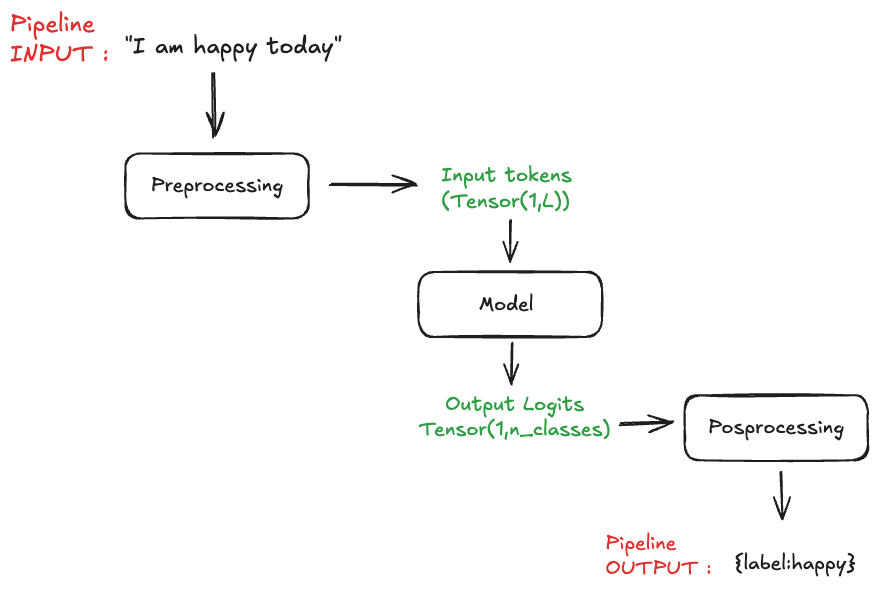
Whether it is computer vision or NLP we usually never exploit models by throwing in raw tensors at them. Instead, we often want to include additional steps like preprocessing the input variables along with postprocessed output variables. For that we can rely on the ensemble model feature from Triton Inference Server.
Here an example of a NLP sentiment analysis pipeline:
More resources can be found here:
Preprocessing Model
The preprocessing part is usually handled in Python or C++, here we’ll implement a simple script that allows tokenizing the input text query.
Here is the file structure of what we are building:
├── preprocessing
│   ├── 1
│   │   └── model.py
│   └── config.pbtxt
Implementation
import json
from transformers import AutoTokenizer
import triton_python_backend_utils as pb_utils
import yaml

class TritonPythonModel:
    """Your Python model must use the same class name. Every Python model
    that is created must have "TritonPythonModel" as the class name.
    """
    def initialize(self, args):
        """`initialize` is called only once when the model is being loaded.
        Implementing `initialize` function is optional. This function allows
        the model to initialize any state associated with this model.
        """

        self.logger = pb_utils.Logger
        params = json.loads(args['model_config'])['parameters']
        recipe_file = params['recipe_file']['string_value']
        try:
            with open(recipe_file, 'r') as file:
                backbone_model_name = yaml.safe_load(file)['backbone_model_name']
        except Exception as e:
            raise pb_utils.TritonModelException(f"An error occurred loading the YAML file: {e}")
        self.tokenizer = AutoTokenizer.from_pretrained(backbone_model_name)
        self.max_seq_len = int(params.get('max_seq_len', 8128))
        print('Initialized...')

    def execute(self, requests):
        """`execute` must be implemented in every Python model. `execute`
        function receives a list of pb_utils.InferenceRequest as the only
        argument. This function is called when an inference is requested
        for this model.
        """
        responses = []
        TASK_PREFIX = 'classification: '

        for request in requests:
            input_query = pb_utils.get_input_tensor_by_name(request, "QUERY").as_numpy()
            input_query = [TASK_PREFIX + q.decode('utf-8') for q in input_query.flatten()]
            self.logger.log_info(f'Input query : {input_query}')
            batch_input = self.tokenizer(
                input_query,
                padding="max_length",
                max_length=self.max_seq_len,
                truncation=True,
                pad_to_multiple_of=8,
                return_tensors="np",
            )

            out_tensor_input_ids = pb_utils.Tensor("INPUT_IDS", batch_input['input_ids'])
            out_tensor_attention_mask = pb_utils.Tensor("ATTENTION_MASK", batch_input['attention_mask'])
            inference_response = pb_utils.InferenceResponse(
                output_tensors=[out_tensor_input_ids, out_tensor_attention_mask])

            responses.append(inference_response)

        return responses

    def finalize(self):
        """`finalize` is called only once when the model is being unloaded."""
        print('Cleaning up...')
Classifier Model
Now that we have a preprocessing that successfully converts raw text queries to tokens representation. One way to proceed would be to take our model (usually trained with Pytorch), convert it to an ONNX model and run it as is with the appropriate configuration pointing toward the onnx_runtime backend.
Here is the file structure of what we are building:
├── model_trt
│   ├── 1
│   │   └── model.plan
│   └── config.pbtxt
At the time of writing, the faster inference backend is TensorRT, under the hood the model will undergo a compilation process.
A Quick Word on Compilation
Compiling a model is a step that converts an ONNX model to a CUDA graph. Behind the curtain, the compiler sweeps through the neural network operations and identifies the faster kernel that can be used for the given GPU architecture. Additionally the compiler identifies operations that can be merged into a single kernel (see Kernel Fusing in the literature).
Fusing kernel allows faster execution as it reduces the overhead of the memory movement that is the main bottleneck in GPU behavior.
Since the compilation outcome depends on the GPU compute capability you will need to compile the model for each GPU architecture you want to deploy on.
Postprocessing Model
Here is the file structure of what we are building:
├── postprocessing
│   ├── 1
│   │   └── model.py
│   └── config.pbtxt
Performance Analyser
server/docs/user_guide/architecture.md at main · triton-inference-server/server